HOME

ABOUT US

OUR PROJECT

CONTACT US

SUPPORT

Edit Content

Introduction

This guide explains how to edit content using Elementor in WordPress. You can update text, buttons, and other page content without changing the page layout or images.

Before You Start

Make sure:

  1. You have Administrator or Editor access.

  2. Elementor is installed and activated.

  3. The page you want to edit already exists.

Open Page in Elementor

Step 1: Edit Page with Elementor

  1. Navigate to Pages → All Pages

  2. Hover over the page you want to edit.

  3. Click Edit with Elementor.

Edit Text Content

Step 1: Select Text Widget

  1. Click on the text you want to edit (Heading, Text Editor, Button, etc.).

  2. The Elementor settings panel will appear on the left.

Step 2: Update Text

  1. Under the Content tab, edit the text directly.

  2. Changes will appear instantly on the page preview.
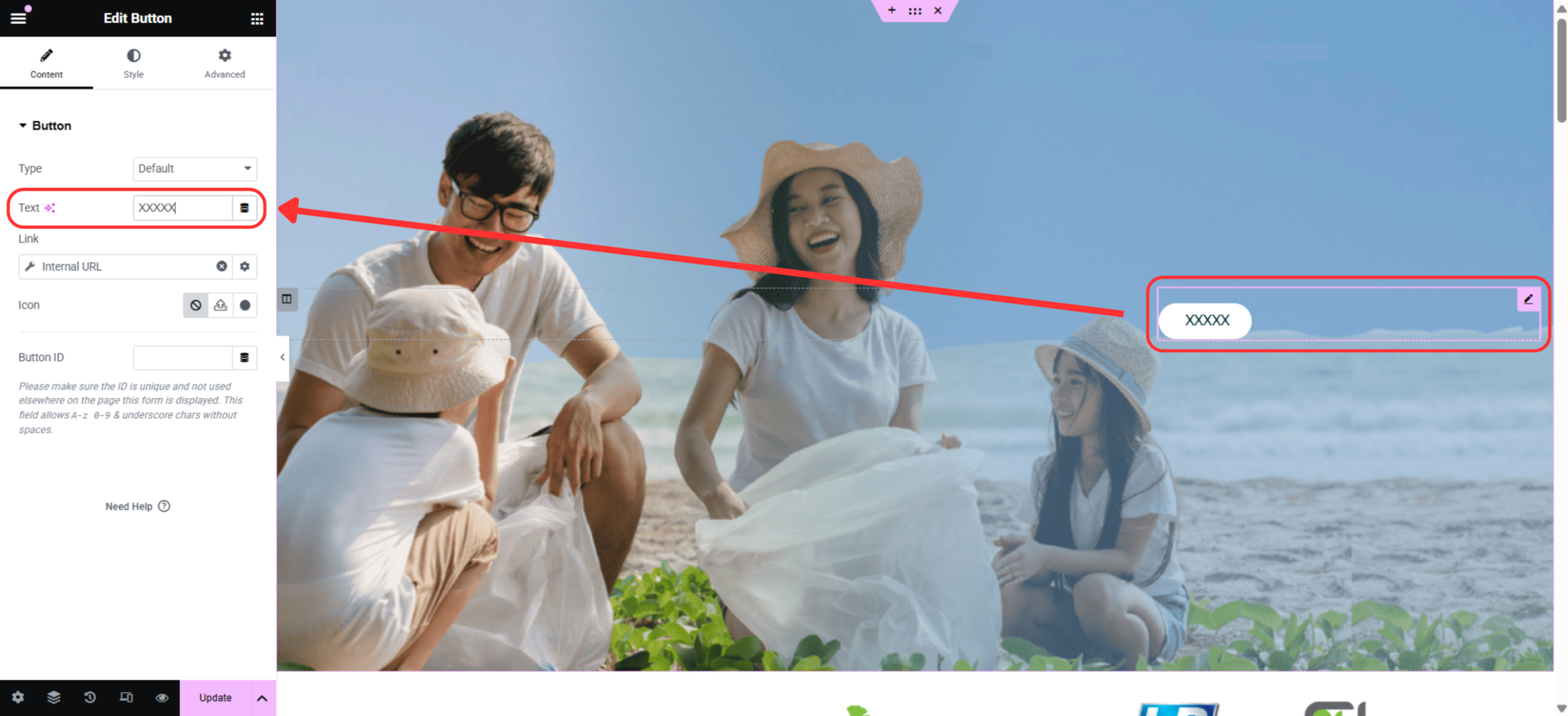
Edit Buttons

  1. Click the Button widget.

  2. Update Button text

  3. Click Update to save changes.

2